
For the first time in internet history, automated bots now generate more web traffic than humans. Most analytics tools are only catching part of it. This guide explains what's happening, how to spot it in your data, and what to do about it.
The milestone nobody was ready for
On April 27, 2026, bots surpassed human visitors on the internet for the first time in recorded history. Cloudflare, which processes traffic for a substantial share of the web's infrastructure, confirmed the crossover through its public Radar dashboard, which tracks bot vs. human HTTP request distribution in real time.
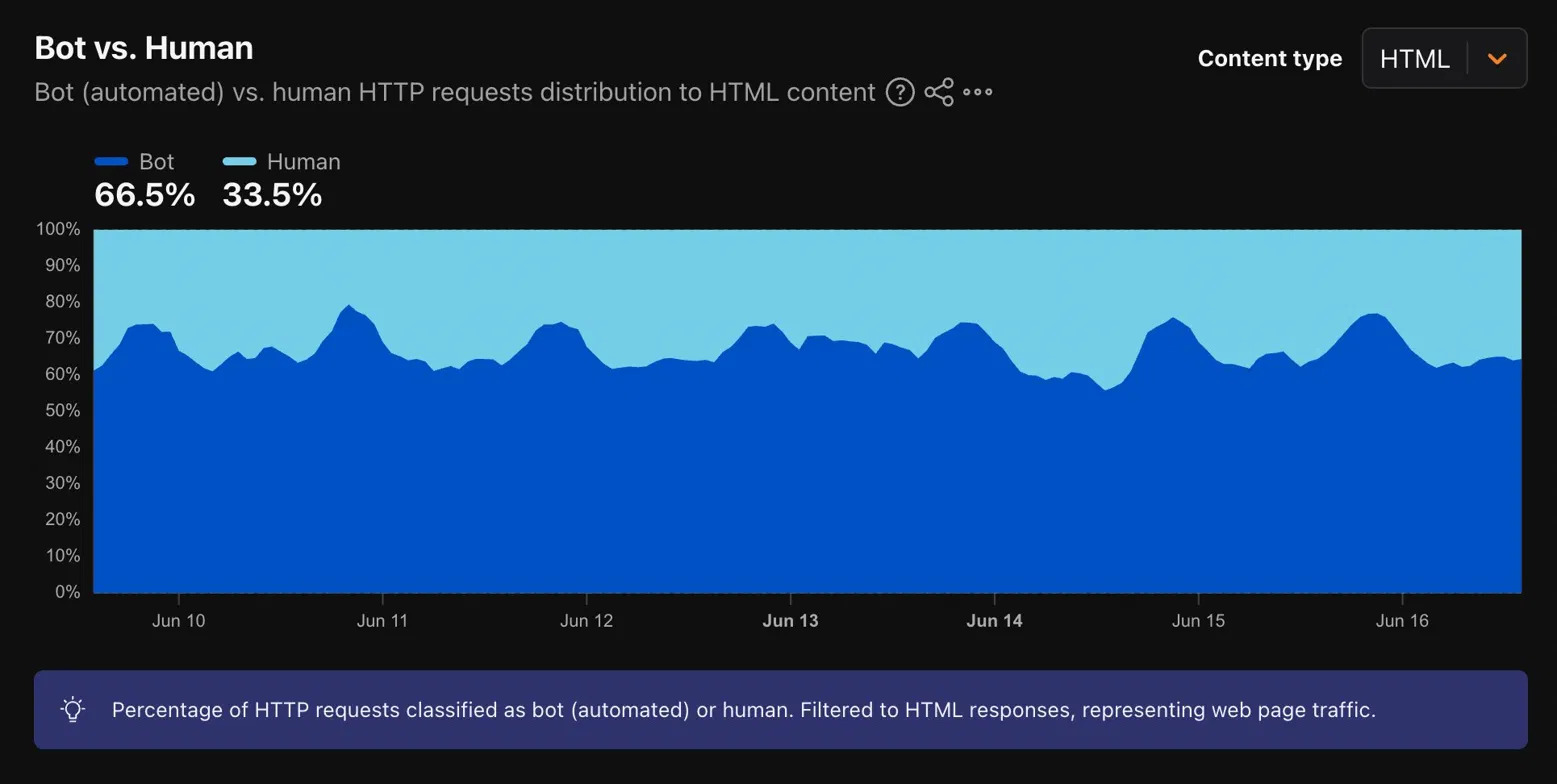
Globally, bots now account for roughly 57.5% of web requests, with humans generating the remaining 42.5%. But for North America specifically, the gap is even wider. Cloudflare Radar data captured on June 16, 2026 shows 66.5% of HTML requests in North America are bot-generated, with just 33.5% coming from human visitors. Two thirds of web traffic in this region is now automated.
"Welp, that happened faster than I predicted," Cloudflare CEO Matthew Prince wrote on X after the April crossover. He had originally forecast the milestone for late 2027, then revised it to early 2027. Neither estimate was close. The driver is agentic AI: where a human shopping for a camera might visit five websites, an AI agent completing the same task might visit 5,000. The scale difference isn't marginal. It's civilizational.
You can verify this yourself at radar.cloudflare.com. Select Bot vs. Human, set content type to HTML, and filter to North America. What you're looking at is not a model or an estimate; it's Cloudflare's live read of traffic flowing through their network, updated continuously.
This isn't just a security story. It's an analytics story. If the majority of traffic hitting your site is automated, and your analytics tools are only filtering a known subset of bots, then the data you're making decisions on is systematically distorted in ways most teams haven't accounted for.
Not all bots are the same
Before treating all bot traffic as a problem to eliminate, it's worth being precise about what you're dealing with. Bots exist on a spectrum from genuinely useful to actively harmful.
Good bots, welcome and expected. Search engine crawlers (Googlebot, Bingbot, Applebot) are how your site gets indexed and ranked. Blocking them is one of the most damaging things you can do to your organic traffic. Uptime monitors, security scanners, feed aggregators, and legitimate partner APIs also fall here. These should be allowed, and Cloudflare maintains a verified good-bot list for exactly this reason. AI crawlers from major platforms (GPTBot for OpenAI, ClaudeBot for Anthropic, PerplexityBot) sit in an increasingly important category. Whether you want them crawling is a strategic decision (blocking them means your content won't appear in AI-generated answers), but they aren't "bad" bots in the traditional sense.
Nuisance bots, low harm but data-distorting. Scrapers pulling your content for aggregation or competitor intelligence, price comparison bots, and content monitoring tools all fall here. They're not attacking you, but they inflate page-view counts, skew session metrics, and waste server resources.
Bad bots, active threats. Referral spam bots inject fake sessions into your analytics to manipulate data or promote spam domains. Click fraud bots simulate ad clicks to drain budgets or inflate publisher revenue. Credential stuffing bots run automated login attempts using leaked credentials. Form spam bots submit junk data to contact forms and lead-capture pages. These cause real damage: corrupted analytics, wasted ad spend, compromised accounts, and polluted CRMs.
The Imperva 2024 Bad Bot Report found bad bots accounted for 37% of all internet traffic, a 15.6% year-over-year increase and the highest level since they began tracking in 2013.
Why your analytics aren't catching all of it
GA4 does filter bot traffic automatically. The problem is what it filters: known bots and spiders on the IAB/ABC International Spiders and Bots List. This is a curated list of verified, well-behaved crawlers. It is not a list of the bots that are causing you problems.
The bots that distort your analytics (referral spammers, scrapers operating under fake user agents, ghost traffic generators using the Measurement Protocol, newer AI crawlers not yet on any list) are largely invisible to GA4's built-in filtering. They get recorded as real sessions.
A 2025 test by Plausible Analytics demonstrated this directly: they sent bot traffic to a test site using GA4 and found GA4 recorded it as legitimate sessions, complete with unique visitor attribution. GA4 failed to filter based on the user-agent header, failed to recognize data-center IP ranges (Plausible excludes around 32,000 data-center IP ranges by default; GA4 does not), and failed to detect the unnatural traffic patterns.
The three types of unfiltered bot traffic to know:
Crawler and scraper spam. Bots that actually visit your site but aren't human. They show up with real hostnames, often from data-center IP ranges (AWS, Azure, Google Cloud, DigitalOcean, Linode), with near-zero engagement time and no scroll events.
Referral spam. Bots that visit and leave a spoofed referral URL. They appear in your Traffic Acquisition report as real referral sources from domains you've never heard of. The classic tell is a 100% bounce rate or zero engagement, single-page sessions, and volumes that appear overnight from a source with no legitimate relationship to your site.
Ghost spam. The most insidious type. These bots never visit your site at all. They send hits directly to your GA4 Measurement ID using the Measurement Protocol, fabricating sessions entirely. You'll see traffic that doesn't correspond to any actual page load. They can even make pages appear to have traffic that were never published.
Reading your GA4 data for bot signals
You can't fully clean historical data in GA4, but you can diagnose how much of a problem you have and build a view of what real traffic looks like.
Signs to look for
Traffic spikes with no explanation. A sudden jump not tied to a campaign, season, or known event is worth investigating. Bots arrive in clusters. Check whether the spike correlates with engagement or conversion; real spikes do, bot spikes don't.
Zero or near-zero engagement time. Legitimate visitors virtually always register some engagement time. A segment averaging 0 to 2 seconds at scale is almost certainly not human. Check Reports → Engagement → Overview for sources or pages with this pattern.
Sessions with "(not set)" browser or OS. Bots running headless browsers or scripts often fail to pass standard fingerprint info. Filter for sessions where Browser or Operating System is "(not set)", which are strong candidates for non-human traffic.
Traffic from data-center IP ranges. Real visitors use residential or mobile ISPs. Traffic from AWS, Azure, Google Cloud, DigitalOcean, OVH, or Linode is almost never human. In GA4 Explore, pull the Service Provider dimension; a regex filter like .*(aws|amazon|azure|googlecloud|digitalocean|ovh|linode).* will surface it.
Impossible interaction speeds. A human can't meaningfully read, scroll, and submit a form in 1.5 seconds. Look at events-per-session alongside session duration. 40 events in 4 seconds is a bot signature, not an engaged user.
Single-page sessions at scale from one source. If a referral source or country drives hundreds of sessions with 100% single-page visits and zero secondary interactions, the math doesn't support legitimate traffic.
Suspicious referral domains. Randomly generated domain names, sources you have no record of linking to you, or referrals with zero engagement are referral spam. Check Traffic Acquisition filtered to Referral.
Unusual geographic concentrations. Outsized volume from countries you don't target and have no history of serving warrants scrutiny.
Building a cleaner view with Explorations
GA4's Explore section gives you more filtering control than the standard reports. Create an exploration with Sessions as your metric. Add dimensions for Session Source, Landing Page, Country, and Device Category. Apply filters excluding sessions where engagement time is below a threshold (start with under 5 seconds), where the browser is "(not set)", and where the source matches known spam patterns. Compare this filtered view against your standard reports; the gap is a working estimate of how much non-human traffic is distorting your baseline. Save it as a custom report you return to regularly.
GA4's internal bot filtering settings
GA4 automatically excludes known bots and this cannot be disabled; it's always on. What GA4 does let you configure is an internal filter to exclude traffic by IP address. Go to Admin → Data Streams → your web stream → Configure Tag Settings → Define Internal Traffic, and add the IPs or ranges of your office, remote employees, and dev environments. Then in Admin → Data Filters, activate the Internal Traffic filter. This doesn't address external bots, but it's a basic hygiene step many teams skip.
For referral exclusions, go to Admin → Data Streams → your web stream → Configure Tag Settings → List Unwanted Referrals. One caution: adding a domain here reclassifies it as direct traffic rather than blocking it. It's useful for keeping payment processors and checkout redirects out of your referral reports, but it's not the right tool for spam filtering.
Google Tag Manager: filtering before the data hits GA4
The most effective place to filter bot traffic is before it ever reaches GA4, at the tag level, using Google Tag Manager. This prevents the data from being recorded at all rather than filtering it after the fact.
The minimum engagement threshold
The most broadly useful GTM filter is to only fire your GA4 tags when the user has shown some minimum real engagement. The simplest implementation uses a scroll-depth trigger. Create a Scroll Depth trigger set to 10% vertical depth and add it as an additional firing condition (alongside your Pageview trigger) for your GA4 Configuration tag. Bots that load a page without scrolling, which is most of them, never fire the tag and never appear in your data. The trade-off is that users who read above-the-fold content and leave quickly are also excluded. For most business use cases, that's an acceptable trade for substantially cleaner data.
Engagement time conditions
An alternative or complement is to only fire GA4 tags after a minimum time on page. Create a Timer trigger set to a minimum interval (5,000 ms is a reasonable start) and add it as a firing condition. Sessions where no time passes before the tag fires are automatically excluded.
User agent filtering via custom variables
GTM can read the user agent of each request. Bots frequently use user agents that don't match any real browser (or none at all), or outdated version strings no current human would run. Create a Custom JavaScript variable that reads navigator.userAgent and checks it against a list of known bot signatures; if it matches, return true. Add a blocking trigger to your GA4 tags that fires when this variable is true. This requires maintaining a signature list, which evolves over time, but community-maintained lists are available.
Honeypot fields for form spam detection
If bot form submissions are inflating your conversion tracking, add a hidden input to your forms (hidden via CSS, not the hidden attribute, since bots read hidden inputs). Real users never see or fill it; bots typically populate every field. Use GTM to check whether the field has a value at submission; if it does, suppress the conversion event.
Server-side GTM
For teams with the technical resources, server-side GTM moves tag execution from the browser to a server you control, letting you inspect, modify, or block hits before they're sent to GA4. It's more reliable than client-side filtering because server-side code runs before bots can interfere. It requires separate hosting and more setup, but it's the most robust solution where data quality is critical.
Cloudflare: stopping bots before they hit your site
The approaches above clean up your analytics, but they don't stop bots from hitting your server. For that, you need a layer in front of your site. Cloudflare is the most accessible option for most businesses, available at a range of plan levels including free.
What Cloudflare does
Cloudflare sits between the public internet and your web server, inspecting every request before it reaches you. It can challenge, block, or allow traffic based on bot scores, user agents, IP reputation, behavioral patterns, and explicit rules you define. The important distinction is that Cloudflare maintains a Verified Bots list of known, well-behaved crawlers including search engines and legitimate AI crawlers. Whitelisting these before you deploy blocking rules makes sure you don't accidentally destroy your search indexing while filtering bad actors.
The free plan: Bot Fight Mode
Every Cloudflare account, including the free tier, includes Bot Fight Mode, a simple on/off toggle under Security → Bots. Enabling it activates baseline detection against known bot patterns and challenges automated traffic that matches. You can't customize it or write exceptions on the free plan, but enabling it is a meaningful first step and costs nothing. (Cloudflare Tunnel users: check your configuration first, because tunnels can fail with Bad Handshake errors if automated tunnel traffic is challenged. Keep "Definitely Automated" set to Allow for tunnel traffic.)
Pro and Business plans: Super Bot Fight Mode
The Pro plan (around $20/month) adds Super Bot Fight Mode, with configurable actions per bot category:
- Definitely automated: Block, JS challenge, or managed challenge
- Likely automated: same action options
- Verified bots: Allow (keep this set to Allow, since these are Googlebot and the like)
- AI scrapers and crawlers: Block or allow, as a separate toggle
It also lets you write WAF custom-rule exceptions, so you can explicitly allow specific automated traffic (your own monitoring tools, partner APIs) while the blanket rules handle everything else.
Custom WAF rules for precise control
On any paid plan, custom WAF rules give you precise control. Some practically useful ones:
- Block by user agent pattern: match requests where
http.user_agentcontains bot strings you've found in your logs, and set the action to Block. - Challenge requests with no user agent: legitimate browsers always send one, so a rule matching
http.user_agent eq ""with a Managed Challenge catches many simple bots. - Rate limiting by IP: under Security → WAF → Rate Limiting Rules, set a per-IP threshold appropriate to your normal patterns.
- Country-based challenges: apply a managed challenge (not a block, since legitimate VPN users exist) to regions you don't serve.
- Block data-center IP ranges: Cloudflare's IP reputation and the
cf.threat_scorefield help, and for specific ranges from your logs, a custom rule matching source IPs is effective.
Enterprise Bot Management
Cloudflare's full Bot Management product (Enterprise add-on) gives every request a bot score from 1 (definitely automated) to 99 (definitely human), generated by ML analysis of hundreds of signals, which you can write rules against per endpoint. For most small-to-medium sites, Super Bot Fight Mode plus targeted custom rules is sufficient. Enterprise is worth evaluating where bot traffic has material commercial impact, such as ecommerce with price-scraping problems, high-value APIs, or heavy form spam in CRMs.
Allowing good bots explicitly
Before deploying any blocking rules, create an explicit Allow exception for Cloudflare's Verified Bots. In your WAF custom rules, add a rule matching cf.client.bot (true when Cloudflare has verified the bot as legitimate) and set it to Skip remaining rules. This makes sure Googlebot, Bingbot, and other essential crawlers are never caught in your filtering.
Server logs: the source of truth GA4 can't give you
Every web server generates access logs recording every request, including bots that load pages without executing JavaScript, which means they never trigger GA4 at all. Server logs show the real shape of your traffic in a way no analytics tool can.
What to look for
Access logs record IP, timestamp, request path, user agent, status code, and bytes transferred for every request. Analyzing them reveals:
- Which user agents make the most requests
- Which IPs make excessive requests (rate patterns no human produces)
- Which paths are targeted (bots often probe
/wp-login.php,/admin,/.env) - What proportion of requests come from known bot user agents vs. unknown ones
For AI crawlers specifically, look for user agents including GPTBot, ClaudeBot, PerplexityBot, Google-Extended, CCBot, and Amazonbot.
Practical log analysis
On a standard hosting setup, your logs are typically accessible via your hosting control panel or via SSH at /var/log/apache2/access.log or /var/log/nginx/access.log.
To count requests by user agent (Linux/Mac terminal):
cat access.log | awk -F'"' '{print $6}' | sort | uniq -c | sort -rn | head -50To identify the most active IPs:
cat access.log | awk '{print $1}' | sort | uniq -c | sort -rn | head -50If an IP is making thousands of requests per day, cross-reference it against a data-center IP lookup (ipinfo.io, ipapi.co) to confirm it's automated. For cloud-hosted sites (AWS, GCP, Azure), check your load-balancer access logs. Cloudflare customers can see traffic analytics directly under Analytics → Traffic, broken down by bot classification without parsing raw logs.
robots.txt: useful, not sufficient
A robots.txt file communicates crawling preferences to bots that choose to respect it. The key word is choose. Well-behaved bots (Googlebot, legitimate AI crawlers, uptime monitors) read and follow it. Bad bots largely do not.
It's worth maintaining correctly: it keeps legitimate crawlers from indexing pages you don't want indexed, and it's where you set crawl-rate preferences. But it is not bot protection, and treating it as a security measure creates a false sense of control. If you want to allow certain AI crawlers while blocking others, robots.txt is the right place to communicate that to crawlers that respect it. For everything else, WAF rules and bot-management tools are what actually enforce behavior.
The business impact of ignoring this
Bad bot traffic doesn't just inflate vanity metrics. It affects real decisions.
Content performance is misread. Inflated page views from scraper traffic can make content look like it's performing well when it isn't reaching real humans, so resources get invested in the wrong areas.
Conversion rates are artificially depressed. Bots generating zero-conversion sessions push your measured conversion rate below your actual rate among humans, distorting how you evaluate campaigns, landing pages, and funnels.
Ad spend is wasted. Click-fraud bots consume budget without real intent. Spider AF's 2025 Ad Fraud Report found an average fraud rate of 5.12% across over 4.15 billion analyzed clicks, with some networks above 46%.
CRM data is polluted. Form spam submits junk leads that require sales time to identify and discard. At volume, this creates significant noise in lead scoring, pipeline reporting, and revenue attribution.
SEO signals are muddied. Some bot traffic has been found to negatively affect how search engines interpret site engagement signals, and a spike in zero-engagement sessions can, in edge cases, send confusing quality signals.
Practical priority order
If you're starting from zero, here's how to sequence your effort.
Immediately:
- Enable Cloudflare Bot Fight Mode (free, takes two minutes)
- Verify GA4's internal traffic filters are configured with your own IP addresses
- Check your Traffic Acquisition report for obvious referral spam, meaning sources driving high sessions with zero engagement
Short term:
- Analyze GA4 Explore using engagement time and browser/OS dimensions to quantify how much bot traffic is getting through
- Build a cleaner GA4 segment excluding zero-engagement sessions, "(not set)" browser, and known spam referrals, then use it as your reporting baseline
- If on Cloudflare Pro or above, configure Super Bot Fight Mode with explicit Allow for Verified Bots
Ongoing:
- Pull server logs monthly to identify new bot user agents and IP ranges
- Review Cloudflare's Bot Analytics regularly to understand what's blocked and what's getting through
- Audit GA4 for new spam patterns, since referral spammers cycle through new domains frequently
If your site processes significant ad spend or has a sales function that depends on lead data, investing in server-side GTM and Cloudflare's paid bot management is worth a proper evaluation. The cost of bot-corrupted data compounds over time; the cost of the tools is fixed.